Sari la conținut
AssetQuarry

Smooth Zoom Pan – jQuery Image Viewer

10,00 €

This is a javascript / CSS based image viewer prepared to display product photos, maps or any image within custom small area. Can be configured and implemented in web pages with simple copy / paste steps. Supports all major touch enabled devices and platforms iOS,…

Why it is worth it

A long-established, well-rated jQuery image viewer with extensive zoom, pan and touch options. It has a large sales record and a straightforward setup.

  • Simple setup with just width and height
  • More than 30 customisation parameters
  • Touch and pinch zoom on major platforms
  • Landmarks, callbacks and external button control
  • Strong rating of 4.66 from 232 reviews
  • Last updated in 2015, so check it against your jQuery version
  • Relies on jQuery, which modern projects may not use

Best for: Developers who need a lightweight, configurable zoomable image or map viewer on a jQuery-based website.

Affiliate disclosure: this product is sold on Envato Market. If you buy through our link we may earn a commission, at no extra cost to you.
  • 5,799 sales
  • 4.66 (232)
  • by VF
  • Updated September 5, 2015

Description

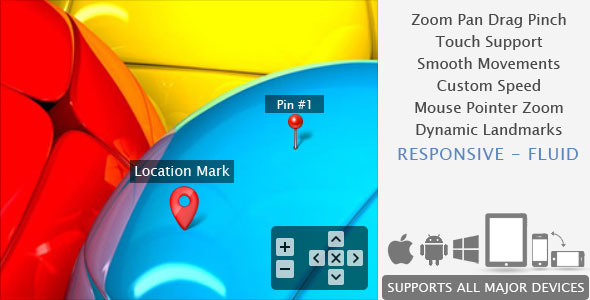
Smooth Zoom Pan - jQuery Image Viewer - 1    Smooth Zoom Pan - jQuery Image Viewer - 2   Smooth Zoom Pan - jQuery Image Viewer - 3    Smooth Zoom Pan - jQuery Image Viewer - 4

This is a javascript / CSS based image viewer prepared to display product photos, maps or any image within custom small area. Can be configured and implemented in web pages with simple copy / paste steps. Supports all major touch enabled devices and platforms iOS, Android and Windows.

More than 30 parameters available to customize, yet a standard version can work simply with 2 values:

$('#yourImageID').smoothZoom({
    width: <Enter Width>,
    height: <Enter Height>
});

Options:

  • Initial Zoom level
  • Initial Position
  • Maximum zoom level
  • Minimum zoom level
  • Animation Smoothness
  • Animation Speed for Zoom
  • Animation Speed for Pan
  • Fit or Fill the image
  • Enable / Disable Pan buttons
  • Enable / Disable Pan Limitation
  • Adjustable Button Size, Color, Transparency, Alignment and Margin
  • Button Auto Hide and Delay Time
  • Mouse Drag / Touch Drag
  • Mouse Wheel zoom control
  • Mouse Cursor location zoom on mouse wheel
  • Mouse Double Click zoom
  • Border size, color, transparency
  • Full browser size option
  • Max width and height (for window resize)

UPDATE V1.7: [30 MAY 2014]

  • Windows 8 Phone / Tablet, IE10+ support added
  • Now works with pointer events for consistent touch support and compatibility
  • UPDATE V1.6.9: [18 MAR 2013]

  • jQuery version 1.9.1 support added
  • PrettyPhoto version 3.1.5 support added
  • IE6 support fully dropped
  • UPDATE V1.6: [10 JUN 2012]

  • Responsive & Fluid layout support added with adjustable settings
  • A new method added to resize view area any time after initiation
  • Landmarks can resize on zoom (Except IE8 & below)
  • Custom alignment – on clicking reset button aligns the image in specified way
  • Pan direction can be reversed through settings
  • Separate speed settings for zoom and pan
  • Few minor big fixes and few more minor options added.
  • UPDATE V1.5: [18 MAR 2012]

  • Single Step Zoom – Possible to reach maximum and minimum zoom levels in one click
  • Touch friendly Button size – Option to set different button size for Touch devices
  • 2 New callbacks added
    – Triggers each time the scale / position values updated (on each animation frame)
    – Triggers whenever landmark?s visibility changes
  • iOS bugs fixed – The landmark position related issues on iPad, iPhone, iPod fixed
  • Chrome bug fixed – The random black border appearance on google chrome fixed
  • UPDATE V1.4: [04 MAR 2012]

  • Dynamic Landmarks – Possible to add / remove / refresh landmarks on runtime.
  • focusTo method improved with custom speed parameter.
  • Possible to set custom callback functions on the following 2 occasions:
         – On Image Load.
         – Everytime the zoom/pan action completes (returns scale / position data).
  • UPDATE V1.3: [12 FEB 2012]

  • Landmarks / Lables / Location Pin support added. (Preview #5)
  • Thumbnail Gallery example added. (Preview #6)
  • Lightbox Gallery example added. (Preview #7)
  • Pinch Zoom support added for touch device navigation
  • FireFox 10+ bug of not able to drag fixed
  • Coding improved to meet better performance
  • UPDATE V1.2: [02 NOV 2011]

  • Additional method added to retrieve current position and zoom values (sample #4)
          This data will be helpful in the following occasions:
          1. To make Crop Tool
          2. To store the current zoom data and re-open the page with exact same level and position
  • Now the fullscreen offset value can be set for both width & height in percentage
  • UPDATE V1.1: [20 OCT 2011]

  • Added ability to control all the button actions from outside the plugin (using your own buttons)
  • Added option to remove all the buttons (for the above purpose)
  • Source file contains 4 example variations to start customisation easily
  • Performance:

    Smoothness varies according to browser capabilities. The plugin utilizes best available options on modern browsers while managing visibility on older browsers:

    Smooth Zoom Pan - jQuery Image Viewer - 5

    Frequently asked questions

    What do I need to use Smooth Zoom Pan?

    The plugin requires jQuery. A basic setup needs only a width and a height applied to your image element.

    Does it work on touch devices?

    Yes. It supports iOS, Android and Windows touch devices, including pinch zoom and pointer events for IE10+.

    Which browsers are supported?

    The item lists IE7 to IE11, Edge, Firefox, Safari, Opera and Chrome as compatible. Animation smoothness varies with the browser's capabilities.

    Can I use my own zoom buttons?

    Yes. The built-in buttons can be removed and all actions controlled from outside the plugin with your own buttons.

    Is it up to date with the latest jQuery versions?

    The last update was in 2015, and the description mentions support for jQuery 1.9.1. Check the live demo and item page to confirm compatibility with your jQuery version.